 Illustration by ChatGPT
SCREENish Help — Camera & Face check-in
“Camera malfunction” popup: what it means and how to fix it (Windows)
What this message means
If SCREENish showed you this popup:
Camera malfunction
Your camera appears to be malfunctioning and is not sending any video.
it means your camera turned on but is not sending any picture to the computer. The camera responded when the software switched it on — but then no video ever arrived.
This is a problem with the camera, its cable, or its driver (the small piece of Windows software that runs it). It is not a SCREENish setting, and there is nothing to configure inside SCREENish to fix it.
The good news: in most cases this fixes itself with a simple restart.
Step 1 — Confirm it yourself (takes 1 minute)
You don’t need a technician to find out whether the camera is really broken. Windows has a built-in Camera app that talks to the camera directly:
- Close SCREENish (right-click its icon in the tray, near the clock, and quit) so the two programs don’t compete for the camera during this test.
- Click Start, type Camera, and open the Camera app.
- Look at the picture.
What the result tells you:
Black screen, frozen image, endless spinner, or an error → the camera itself is the problem. Continue with the fix steps below.
You see yourself normally → the camera has recovered (this happens — some faults are temporary). Start SCREENish again and work normally. If the popup comes back later, the camera is failing intermittently — follow the steps below anyway, and mention it to your administrator if it keeps returning.
Remember this test — it is also your proof at the end. If the Windows Camera app can’t show video, no other program can either.
Step 2 — Fix it (easiest first)
Work through these in order. After each step, re-check with the Camera app from Step 1.
1. Restart the computer
Not just sign out — a full Start → Power → Restart. This resets the camera, its USB connection, and its driver in one go, and fixes the large majority of these cases. Do this first, before anything else.
2. Check for a privacy shutter or camera off-switch
Many laptops and webcams have a way to physically block the camera, and a blocked camera behaves exactly like this: it switches on, but sends no picture (or pure black).
- Look for a small sliding cover over the camera lens (or a sticker or tape someone put there).
- Many laptops have a camera on/off key on the keyboard — a key with a camera or crossed-out camera symbol (often F8 or F10). Press it (you may need to hold the Fn key at the same time) and re-test.
- Some webcams have a physical switch on the side or on the cable.
3. Check Windows camera permissions
- Open Start → Settings → Privacy & security → Camera.
- Make sure Camera access is On.
- Make sure Let apps access your camera is On.
- Make sure Let desktop apps access your camera (at the bottom) is On.
4. If it’s a USB (external) webcam — reconnect it
- Unplug it, wait 10 seconds, plug it back in.
- Try a different USB port — ideally one directly on the computer, not on a USB hub, docking station, or monitor.
- Check the cable isn’t pinched or damaged.
5. Reset the camera in Device Manager
This restarts just the camera’s driver:
- Right-click Start → Device Manager.
- Open the Cameras section (sometimes called Imaging devices).
- Right-click your camera → Disable device → confirm. Wait 5 seconds.
- Right-click it again → Enable device. Re-test with the Camera app.
If that didn’t help, do a full driver reinstall:
- Right-click the camera → Uninstall device (tick “delete the driver” if the checkbox is offered) → restart the computer. Windows reinstalls the camera automatically on startup.
6. Stop Windows from powering the camera off
Windows sometimes puts USB devices to sleep to save power, and some cameras don’t wake up properly — they stay on but stop sending video. This is a known cause of exactly this fault, especially on laptops:
- Right-click Start → Device Manager.
- Open Universal Serial Bus controllers.
- Double-click each USB Root Hub → Power Management tab → untick “Allow the computer to turn off this device to save power” → OK.
- If your camera under Cameras also has a Power Management tab, untick the same box there.
7. Update Windows and the camera driver
- Start → Settings → Windows Update → Check for updates — install everything, including anything under Optional updates → Driver updates.
- For laptops: the maker’s support app (Lenovo Vantage, Dell SupportAssist, HP Support Assistant, …) often has a newer camera driver than Windows Update.
8. Check your antivirus’s “webcam protection”
Some security programs (Kaspersky, Norton, ESET, Bitdefender, …) include a webcam-protection feature that can silently block video while the camera appears switched on. Open your antivirus, look for webcam protection / camera privacy, and either allow access for your applications or temporarily turn the feature off and re-test.
Still no picture after all of the above?
If you restarted the computer and worked through the steps and the Windows Camera app still shows no video, the camera hardware is most likely failing and needs to be replaced. That’s not a guess — the Camera-app test proves the fault is in the camera itself, on a program that has nothing to do with SCREENish.
- Laptop built-in camera: a repair is usually not worth it — a basic external USB webcam costs very little, plugs in, and works immediately.
- External webcam: if possible, test it on another computer first. If it fails there too, replace it.
Tell your administrator the outcome — they have already been notified automatically and will see the camera issue on their report until it’s resolved.
Note for administrators
- While an employee’s camera is in this state, your report shows a “Camera malfunction — please contact the employee” card for the affected minutes, so the gap is explained — it is not counted as the employee hiding from the camera.
- The employee sees the popup at most once every 30 minutes; it is intentionally not nagging.
- SCREENish keeps re-checking the camera automatically. The moment the camera works again, face verification resumes by itself — the employee does not need to restart SCREENish or change any setting.
- If the same machine shows the card repeatedly across days, plan a camera replacement — this popup only appears for faults on the employee’s machine that SCREENish cannot work around.
 Illustration by ChatGPT
The New SCREENish Chrome Extension: Full Time Tracking, No Installation Required
Your whole team’s time tracking — screenshots, activity, idle detection and even team calls — now runs inside the one app every computer already has: the browser.
For years, accurate employee time tracking meant installing a desktop application. That works — until your team runs Chromebooks, locked-down corporate laptops, or machines where nobody has installer rights. The new SCREENish Chrome extension removes that wall: the complete SCREENish time tracker, rebuilt to live entirely inside Chrome.
Why a Chrome extension?
Because your team’s computers are no longer all the same. Today a distributed team might span a Windows PC in an office, a MacBook at home, a Linux workstation and a fleet of Chromebooks in a call center — and a Chromebook cannot install desktop software at all. The SCREENish extension gives every one of those machines the same time tracking, the same reports and the same dashboard, with nothing to install beyond the browser.
For companies managing devices with Chrome Enterprise, deployment is one policy: force-install the extension across the entire fleet in minutes — no visits to individual machines, no update chasing. Chrome keeps every seat current automatically.
How it works
The employee experience takes under a minute:
- Log in to the extension with your SCREENish account.
- Pick the project you’re working on.
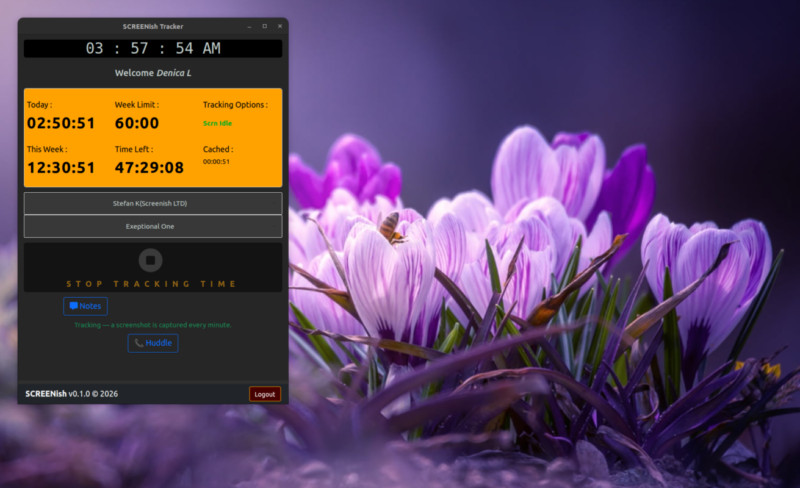
- Press Start and choose your screen — Chrome’s own sharing dialog, so the employee always sees and confirms exactly what is shared.
From there, the extension quietly does its job: one screenshot per minute of the chosen screen, bundled into a report every 10 minutes that lands in the employer’s Work Logs — with the exact 10-minute spacing your dashboard timeline expects. Stop tracking (or end the screen share) and capture halts instantly; the extension has no access to the screen outside an active session.
Built like a time vault: nothing gets lost
Most browser-based trackers lose data the moment the network hiccups. SCREENish’s extension was engineered with one uncompromising rule: recorded work is never lost — not to a dropped connection, not to a storage outage, not even to a wrong computer clock.
- Offline-proof: lose the internet mid-shift and everything — time and screenshots — is stored encrypted on the device and uploaded automatically when the connection returns, whether that’s in ten minutes or next Monday. Reports arrive complete, exactly as if the outage never happened.
- Clock protection: if a computer’s clock is wrong (a classic source of corrupted timesheets), the extension stops tracking, tells the employee exactly how to fix the clock on their operating system, and refuses to resume until it’s correct. Everything recorded beforehand stays safe and uploads once time is right.
- Encrypted at rest: screenshots and unreported time sit in the browser encrypted with a key that cannot be exported from the device.
Privacy your employees can actually read
Monitoring only works when the people being monitored trust it. The extension’s privacy model is deliberately narrow and fully documented:
- It records only the screen the employee selects, only while tracking — enforced technically, not by promise: the share picker offers full screens only.
- No keystroke logging, no mouse recording, no browsing history, no program list. Activity levels are derived purely from whether the computer is in use.
- Employees see their own screenshots in their dashboard, can delete them (with the corresponding time), and all screenshots are automatically deleted after 3 months.
- Away from the keyboard? The idle detection asks “Still there?” and books genuinely idle time separately — visible to the employer as idle, never silently billed as work.
Huddle: your team room, built in
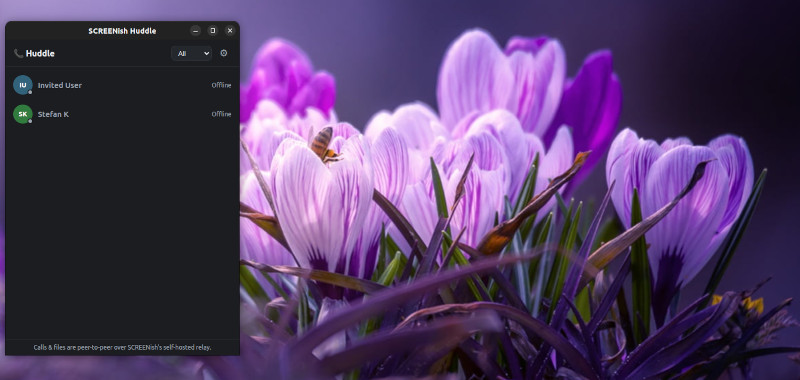
The extension isn’t just surveillance-and-silence. Press Huddle and you get the team layer most trackers make you buy elsewhere:
- Presence — see who’s online and who’s in a call, scoped to the team you’re tracking for.
- 1:1 chat with delivery ticks, replies and offline queuing. Messages are stored only on the participants’ own devices, encrypted.
- Audio and video calls in one click — never recorded, never stored.
- File sharing that skips the cloud entirely: files travel directly from device to device and never touch SCREENish servers.
For the employer: the same dashboard you already know
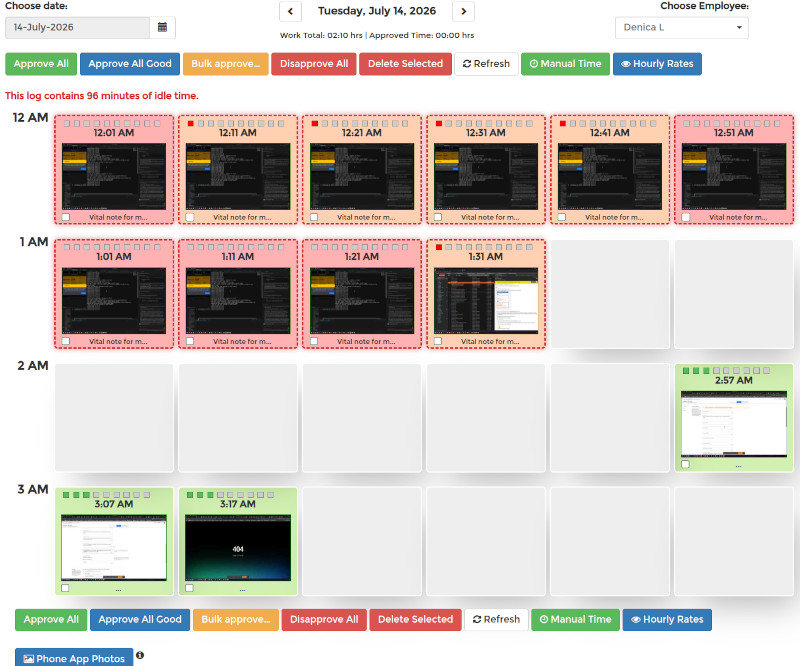
Reports from the extension flow into the same SCREENish dashboard as the desktop apps — the same Work Logs screenshot grid, activity levels, idle accounting, accounting exports and approval workflow. Mixed teams simply work: some employees on the Windows/macOS/Linux desktop app, some on the extension, one consistent picture of the workday.
SCREENish extension vs. desktop app — which one?
|
Desktop app |
Chrome extension |
| Windows / macOS / Linux |
✔ |
✔ (any OS with Chrome) |
| Chromebooks |
— |
✔ |
| Installation rights needed |
yes |
no |
| Screenshots + activity + idle |
✔ |
✔ |
| Offline preservation |
✔ |
✔ |
| Team chat & calls |
✔ |
✔ |
| Fleet deployment |
per machine |
one Chrome Enterprise policy |
Try it with your team
The SCREENish Chrome extension is included in every SCREENish plan — and your first 10 days are free. Install the extension, invite your team, and see the first screenshots arrive in your dashboard within ten minutes.
Start tracking free →
SCREENish is time and attendance software for in-house and remote teams: screenshots, activity levels, idle detection, GPS tracking on Android, and now a full Chrome extension for browser-only and Chromebook teams.
 Illustration by ChatGPT
SCREENish Huddle: Your Team’s Conversations, Finally Yours
Your team already opens SCREENish every day to track time and stay on the same page. Now there’s a brand-new reason to keep it open. Meet SCREENish Huddle — a private place for your whole team to talk, call, and share, built right into the window you already use.
Look for the new 📞 Huddle tab. Behind it you’ll find a team directory, one-to-one chat, audio and video calls, and direct file sharing — all in one spot. And here’s the promise we want to lead with: this is a secure team chat app designed so that your company’s conversations stay your company’s business. There’s nothing new to install and no separate account to create. If you have SCREENish, you have Huddle.
Everyone on your team, one click away
No more hunting through email addresses or trying to remember someone’s username. Open Huddle and a simple team directory shows exactly who you can reach. Message them, call them, or start a video — all from the same list.
Just as important is who can’t show up there. Only people verified as being on your team can message or call you. There’s no inviting the whole internet, no strangers wandering in, and no spam from accounts you’ve never heard of. This is a private team messaging app built for real coworkers, not for the outside world.
Chat one-to-one without leaving a trail
Sometimes you just need a quick answer. Huddle lets you send text messages straight to a teammate, right inside SCREENish — perfect for the day-to-day questions you’d rather not scatter across email threads or some outside app.
Here’s what makes it a genuinely private business messaging app. Messages are delivered while you’re both online. Our server simply passes each one along and then forgets it — so there’s no growing pile of chat history sitting on a server somewhere for anyone to leak, hand over, or mine. The only copy of your conversation history lives on your own computer, and it’s locked to that computer. Copy that history file to another machine and it simply won’t open. Your words stay with you.
Text chat in Huddle is always one-to-one — a real, private conversation between two people.
Jump on a call, face to face
When a call beats typing, start one in a couple of clicks. Reach a teammate by audio or video, or gather a small group — up to four people — for a quick huddle to talk something through together.
This is where private video calls for teams really shine. Whenever your network allows, your call travels straight from one person’s device to the other — device to device, not parked on some company’s cloud. It’s scrambled the entire way, so no one in the middle can watch or listen in. And on the rare occasion a strict office firewall forces a call to take a detour, the point it passes through still can’t make sense of a thing — your conversation stays unreadable to it.
The call also runs in its own separate space that shuts down the moment you close the app. Nothing lingers.
Send files straight to a teammate, and nowhere else
Need to hand someone a document, an image, or a report? Huddle’s secure file sharing for teams is the strictest part of the whole experience.
Files travel straight from your device to your teammate’s device — hand to hand. They never pass through, and never sit on, any server. And if a truly private, direct connection can’t be made, Huddle doesn’t quietly reroute your file somewhere you didn’t choose. It cancels the transfer and tells you clearly. Privacy always wins over convenience. Anything you receive lands neatly in your Downloads folder, right where you’d expect it.
It all lives in one window
Chat, calls, and file sharing sit together under the Huddle tab, so there’s no bouncing between apps all day. Because it’s part of SCREENish, your team stays in the tool they already know. One login, one window, one place for team communication — that’s the whole idea behind a truly built-in team communication tool.
How SCREENish Huddle keeps your team’s conversations private
We think about privacy the way you do — in plain English. Here’s the honest picture of how we help you keep team conversations private:
- Everything runs on our own equipment. Huddle doesn’t hand your team’s calls, chats, or files to Zoom, Slack, Microsoft, or any other outside service. It all stays on infrastructure that SCREENish runs itself. This is genuinely self-hosted team chat — your talk never leaves hands you trust.
- Our server is a switchboard operator that keeps no record. Picture an old-fashioned operator who connects two people and then forgets they ever spoke. That’s our server: it introduces two teammates, passes things along, and saves nothing — no messages, no files, no recordings. Your calls and files are scrambled so the operator couldn’t make sense of them anyway, and your chat messages are gone from our side the instant they’re delivered.
- Nothing sensitive is ever stored. No saved messages, no stored files, no call recordings sitting on a server anywhere. There’s no online history to be leaked, hacked, handed over, or mined — because it was never kept in the first place.
- Your chat history stays on your computer, locked to it. Move that file to another machine and it won’t open. It belongs to one device: yours.
- Calls go straight between the people talking, scrambled the whole way — and even a firewall’s detour point can’t see or hear anything.
- Files go device to device and never touch a server — and a transfer that can’t stay private is stopped, not rerouted.
- Everything travels over secure, protected connections — the same kind of protection you rely on when you log into your bank’s website.
That’s what makes Huddle secure team communication software you can actually explain to your team without a technical manual.
How it’s different
Slack, Zoom, and Teams keep your chats, files, and recordings on their cloud, run by their company. Huddle keeps nothing sensitive on a server at all — your history lives on your own computer, and your files pass straight from one teammate to the next.
The big platforms are built to remember everything forever. Huddle is built to remember as little as possible. There’s no third party sitting in the middle of your team’s business, no server-side history waiting to be exposed, and no extra app to buy, per-seat chat fee, or separate login to juggle. It’s the private version of team chat, calls, and file sharing — your calls scrambled end to end, your chat kept off our servers entirely — already inside the app your team opens every day.
Frequently asked questions
Is SCREENish Huddle really private?
Yes. Your messages, calls, and files run on SCREENish’s own servers, never through Zoom, Slack, or other outside services, and nothing sensitive is ever stored where it could leak.
Where are my chat messages saved?
Only on your own computer. Our server passes each message along and forgets it, so there’s no chat history sitting on a server. The history saved on your device is locked to that device, so copying the file to another computer leaves it unreadable.
Are my calls and video secure?
Yes. Calls are scrambled and sent straight from one person’s device to another whenever possible. In the rare case a strict company firewall has to reroute them, the go-between still can’t see or hear anything.
What happens to files I send?
Files go directly from your device to your teammate’s and never touch a server. If a private direct connection can’t be made, the transfer is cancelled with a clear message rather than quietly rerouted. Files you receive land in your Downloads folder.
Who can message or call me?
Only people verified as members of your own team. Outsiders and strangers can’t reach you through Huddle.
How many people can join, and do I need to install anything?
Text chat is one-to-one, and a call can include a small group of up to four people. There’s nothing new to install — Huddle is built into SCREENish, so just update the app and open the Huddle tab.
Turn on Huddle and start talking privately today
Getting started takes seconds. Update SCREENish, open the 📞 Huddle tab, and your team directory is right there waiting. Send your first message, start a call, or share a file — all in a few clicks.
If you’ve been looking for a team chat app for small business that respects your privacy by design, this is it. Give your team a place to talk freely and share freely, knowing the conversation stays yours. Open Huddle and start talking privately today.
By SCREENish Team


