
Secure, Self-Hosted Team Communication | SCREENish Huddle
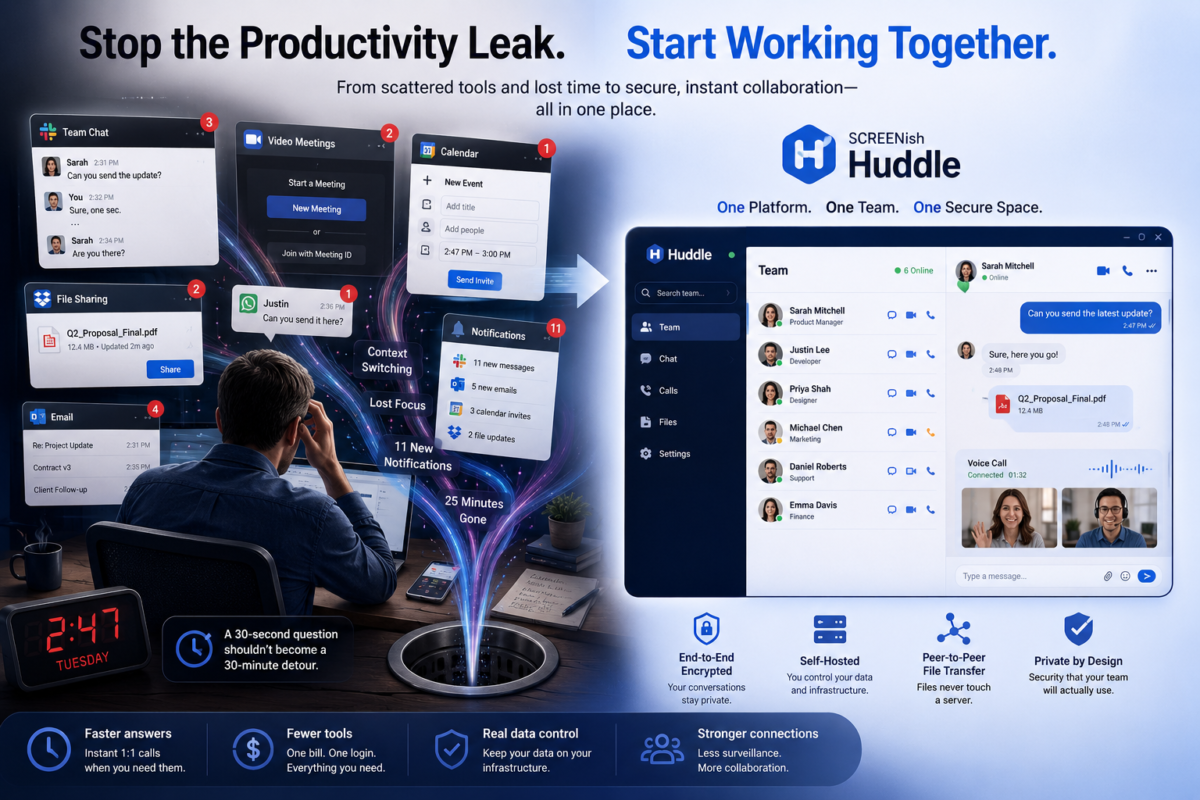
When “Can you hop on a quick call?” Becomes Your Biggest Productivity Leak
It’s 2:47 on a Tuesday. You need a thirty-second answer from someone two time zones away.
So you open your chat app to check if they’re online. You fire off a message. You wait. Nothing. You switch to your video tool to start a call — but it wants a meeting link, and a calendar invite, and a “waiting for host.” You ping them again. Twenty-five minutes later you have your answer, eleven new notifications, three open tabs you didn’t mean to open, and absolutely no memory of what you were doing before.
Multiply that by every question, every person, every day.
This is the quiet tax of managing a distributed team in 2026. Not the big failures — the small frictions, a hundred times a day, that turn a thirty-second question into a thirty-minute detour. And the worst part? The tools that tell you who’s working and the tools your team uses to actually work together are completely different tools. You’re paying for both, switching between both, and stitching them together with willpower.
SCREENish Huddle exists to close that gap.
Problem 1: Your stack is held together with tabs
Most managers of remote and hybrid teams are running, at minimum: a time tracker, a chat app, a video tool, and a file-sharing service. Four logins. Four notification streams. Four places a message can get lost.
The cost isn’t just the subscriptions (though per-seat pricing on four products adds up fast). The real cost is context-switching — the documented productivity killer where every app-hop drains focus and momentum. Your team isn’t slow. Their tools are making them slow.
Huddle collapses that. It lives inside the platform you already use to manage your team’s time and output. The directory you see is the team you actually manage — and it’s presence-aware, so you know at a glance who’s online right now. Need someone? You’re one click from a call, a chat, or a file. No links, no scheduling, no “are you there?” You’re already there.
Problem 2: Nobody can tell you where your conversations actually live
Here’s an uncomfortable question to ask in your next leadership meeting: Where, physically, do our company’s private conversations and files live tonight?
For most teams, the honest answer is: on servers owned by a company you’ve never spoken to. Your strategy discussions, your client details, the contract someone dropped in a chat — all sitting in a third-party cloud, indexed, backed up, and subject to that vendor’s breaches, outages, and terms of service. You don’t control it. You often can’t even fully delete it.
For a growing number of managers — in finance, healthcare, legal, HR, anywhere with sensitive data or compliance obligations — that’s not a minor detail. It’s a liability with your name on it.
Huddle was built the opposite way:
- It’s self-hosted. The relay runs on your infrastructure. Your conversations never leave the perimeter you control.
- The server is blind. It connects two people and forwards encrypted packets — it can’t read your calls, your messages, or your files. Even when a video call has to be relayed through the server (on restrictive networks), the media stays end-to-end encrypted; the relay is just a courier carrying a sealed envelope.
- Chat is encrypted on the device, with a key tied to that specific machine. Copy the database to another computer and it’s unreadable.
- Files never touch a server at all. They travel directly, device to device, encrypted. If a private connection can’t be made, the transfer is cancelled — not quietly rerouted through some cloud. Privacy wins over convenience, by design.
That last point solves a problem most managers don’t realize they have.
Problem 3: Your team is already leaking files — politely
When sending a file through the official tools is annoying, people improvise. They drop it in a personal email. They DM it over WhatsApp. They use whatever’s fastest. Every one of those workarounds is a small, well-intentioned data leak — and you’ll never see it on a dashboard.
The fix isn’t a stern policy. It’s making the secure path the easy path. Huddle’s peer-to-peer file transfer is right there in the chat, it’s fast, and it’s private by default — so there’s no reason for the team to reach for the leaky alternative. Good security that people actually use beats perfect security that they route around.
The shift: from watching work to working together
Time-tracking and workforce tools have always been good at one half of management — accountability. They tell you the work is getting done.
But managing people was never only about supervision. It’s about the quick gut-check before a deadline, the “great job on that” the moment it’s earned, the face-to-face that defuses a misunderstanding before it festers over text. That’s the human half — and historically it lived in a separate, third-party app.
Huddle puts both halves in one place. The platform already knows who’s clocked in and focused; now you can actually reach them — talk, see them, hand them a file — without leaving. Less surveillance-only, more genuine collaboration. For a remote team, that combination is the difference between a manager who feels like a monitor and one who feels like a teammate.
What this actually means for a manager
- Fewer tools, one bill, one login. Communication is bundled with the platform you already run — not a fourth per-seat subscription.
- Faster answers, fewer interruptions. Presence + instant 1:1 calls turn “let me schedule something” into “let me just ask.”
- Real data control. Self-hosted, end-to-end encrypted, files that never leave the wire — something you can put in front of a compliance officer or a nervous client.
- A secure default your team will actually use — so the shadow-IT leaks quietly disappear.
Frequently asked questions
Is SCREENish Huddle secure enough for sensitive or regulated work? Yes. Calls and video are end-to-end encrypted (WebRTC DTLS-SRTP), chat is encrypted at rest with a machine-bound key, and file transfers go strictly peer-to-peer and never pass through a server. Because the relay is self-hosted, the data stays on infrastructure you control.
Do we need Zoom or Slack alongside it? For internal team communication, no — Huddle covers presence, 1:1 audio/video calls, chat, and file sharing inside the platform you already use to manage the team.
Where are our messages and files stored? Chat history lives encrypted on each user’s own device, not on a central server. Files are sent directly between devices. The server only relays encrypted call media when a network blocks a direct connection — and even then it can’t read it.
Does it work on locked-down corporate or VPN networks? Yes. Calls fall back to a TURN relay over TLS on port 443 (the same port as normal HTTPS), so they keep working on restrictive networks without weakening encryption.
The bottom line
Your team-management platform already knows who’s working. The question is whether it can help them work together — privately, instantly, and without dragging your data through someone else’s cloud.
That’s what Huddle adds. One place to see your team, reach your team, and trust that the conversation stays yours.


 Author Administrator ScreenishPosted on Categories Personal development, Productivity, Time management & Time Tracking, Uncategorized, Work Process