 Designed by Freepik
The New SCREENish Chrome Extension: Full Time Tracking, No Installation Required
Your whole team’s time tracking — screenshots, activity, idle detection and even team calls — now runs inside the one app every computer already has: the browser.
For years, accurate employee time tracking meant installing a desktop application. That works — until your team runs Chromebooks, locked-down corporate laptops, or machines where nobody has installer rights. The new SCREENish Chrome extension removes that wall: the complete SCREENish time tracker, rebuilt to live entirely inside Chrome.
Why a Chrome extension?
Because your team’s computers are no longer all the same. Today a distributed team might span a Windows PC in an office, a MacBook at home, a Linux workstation and a fleet of Chromebooks in a call center — and a Chromebook cannot install desktop software at all. The SCREENish extension gives every one of those machines the same time tracking, the same reports and the same dashboard, with nothing to install beyond the browser.
For companies managing devices with Chrome Enterprise, deployment is one policy: force-install the extension across the entire fleet in minutes — no visits to individual machines, no update chasing. Chrome keeps every seat current automatically.
How it works
The employee experience takes under a minute:
- Log in to the extension with your SCREENish account.
- Pick the project you’re working on.
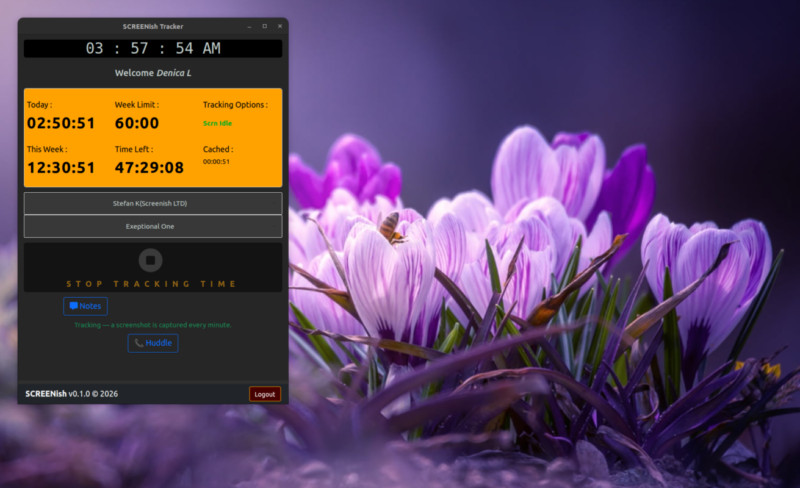
- Press Start and choose your screen — Chrome’s own sharing dialog, so the employee always sees and confirms exactly what is shared.
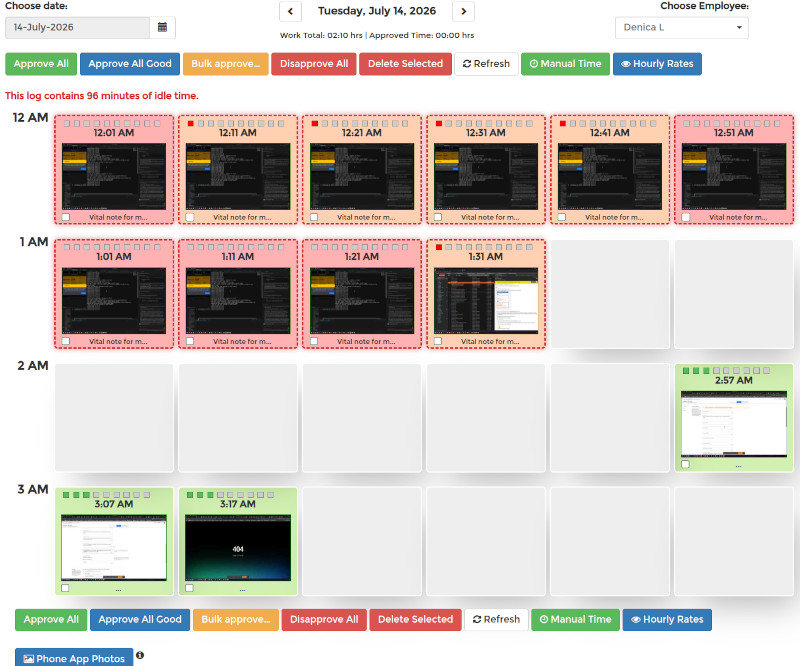
From there, the extension quietly does its job: one screenshot per minute of the chosen screen, bundled into a report every 10 minutes that lands in the employer’s Work Logs — with the exact 10-minute spacing your dashboard timeline expects. Stop tracking (or end the screen share) and capture halts instantly; the extension has no access to the screen outside an active session.
Built like a time vault: nothing gets lost
Most browser-based trackers lose data the moment the network hiccups. SCREENish’s extension was engineered with one uncompromising rule: recorded work is never lost — not to a dropped connection, not to a storage outage, not even to a wrong computer clock.
- Offline-proof: lose the internet mid-shift and everything — time and screenshots — is stored encrypted on the device and uploaded automatically when the connection returns, whether that’s in ten minutes or next Monday. Reports arrive complete, exactly as if the outage never happened.
- Clock protection: if a computer’s clock is wrong (a classic source of corrupted timesheets), the extension stops tracking, tells the employee exactly how to fix the clock on their operating system, and refuses to resume until it’s correct. Everything recorded beforehand stays safe and uploads once time is right.
- Encrypted at rest: screenshots and unreported time sit in the browser encrypted with a key that cannot be exported from the device.
Privacy your employees can actually read
Monitoring only works when the people being monitored trust it. The extension’s privacy model is deliberately narrow and fully documented:
- It records only the screen the employee selects, only while tracking — enforced technically, not by promise: the share picker offers full screens only.
- No keystroke logging, no mouse recording, no browsing history, no program list. Activity levels are derived purely from whether the computer is in use.
- Employees see their own screenshots in their dashboard, can delete them (with the corresponding time), and all screenshots are automatically deleted after 3 months.
- Away from the keyboard? The idle detection asks “Still there?” and books genuinely idle time separately — visible to the employer as idle, never silently billed as work.
Huddle: your team room, built in
The extension isn’t just surveillance-and-silence. Press Huddle and you get the team layer most trackers make you buy elsewhere:
- Presence — see who’s online and who’s in a call, scoped to the team you’re tracking for.
- 1:1 chat with delivery ticks, replies and offline queuing. Messages are stored only on the participants’ own devices, encrypted.
- Audio and video calls in one click — never recorded, never stored.
- File sharing that skips the cloud entirely: files travel directly from device to device and never touch SCREENish servers.

For the employer: the same dashboard you already know
Reports from the extension flow into the same SCREENish dashboard as the desktop apps — the same Work Logs screenshot grid, activity levels, idle accounting, accounting exports and approval workflow. Mixed teams simply work: some employees on the Windows/macOS/Linux desktop app, some on the extension, one consistent picture of the workday.
SCREENish extension vs. desktop app — which one?
|
Desktop app |
Chrome extension |
| Windows / macOS / Linux |
✔ |
✔ (any OS with Chrome) |
| Chromebooks |
— |
✔ |
| Installation rights needed |
yes |
no |
| Screenshots + activity + idle |
✔ |
✔ |
| Offline preservation |
✔ |
✔ |
| Team chat & calls |
✔ |
✔ |
| Fleet deployment |
per machine |
one Chrome Enterprise policy |
Try it with your team
The SCREENish Chrome extension is included in every SCREENish plan — and your first 10 days are free. Install the extension, invite your team, and see the first screenshots arrive in your dashboard within ten minutes.
Start tracking free →
SCREENish is time and attendance software for in-house and remote teams: screenshots, activity levels, idle detection, GPS tracking on Android, and now a full Chrome extension for browser-only and Chromebook teams.
 Designed by Freepik
When “Can you hop on a quick call?” Becomes Your Biggest Productivity Leak
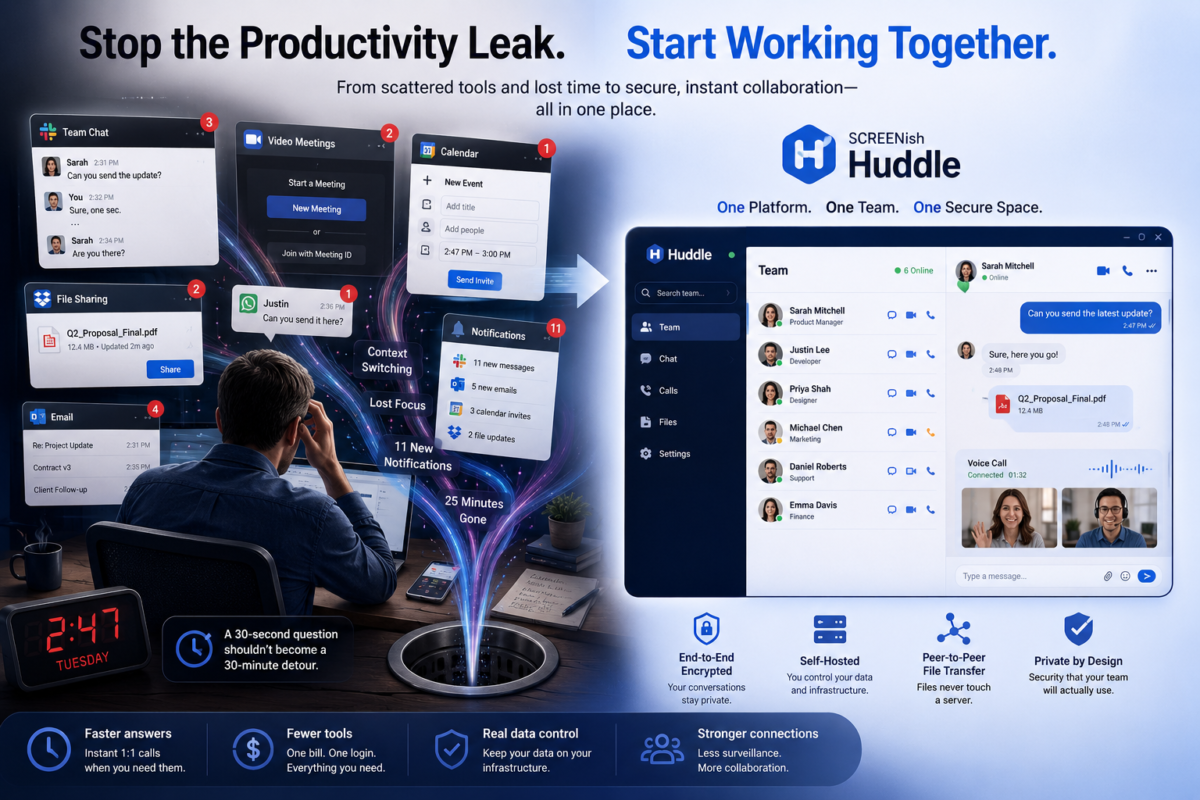
It’s 2:47 on a Tuesday. You need a thirty-second answer from someone two time zones away.
So you open your chat app to check if they’re online. You fire off a message. You wait. Nothing. You switch to your video tool to start a call — but it wants a meeting link, and a calendar invite, and a “waiting for host.” You ping them again. Twenty-five minutes later you have your answer, eleven new notifications, three open tabs you didn’t mean to open, and absolutely no memory of what you were doing before.
Multiply that by every question, every person, every day.
This is the quiet tax of managing a distributed team in 2026. Not the big failures — the small frictions, a hundred times a day, that turn a thirty-second question into a thirty-minute detour. And the worst part? The tools that tell you who’s working and the tools your team uses to actually work together are completely different tools. You’re paying for both, switching between both, and stitching them together with willpower.
SCREENish Huddle exists to close that gap.
Problem 1: Your stack is held together with tabs
Most managers of remote and hybrid teams are running, at minimum: a time tracker, a chat app, a video tool, and a file-sharing service. Four logins. Four notification streams. Four places a message can get lost.
The cost isn’t just the subscriptions (though per-seat pricing on four products adds up fast). The real cost is context-switching — the documented productivity killer where every app-hop drains focus and momentum. Your team isn’t slow. Their tools are making them slow.
Huddle collapses that. It lives inside the platform you already use to manage your team’s time and output. The directory you see is the team you actually manage — and it’s presence-aware, so you know at a glance who’s online right now. Need someone? You’re one click from a call, a chat, or a file. No links, no scheduling, no “are you there?” You’re already there.
Problem 2: Nobody can tell you where your conversations actually live
Here’s an uncomfortable question to ask in your next leadership meeting: Where, physically, do our company’s private conversations and files live tonight?
For most teams, the honest answer is: on servers owned by a company you’ve never spoken to. Your strategy discussions, your client details, the contract someone dropped in a chat — all sitting in a third-party cloud, indexed, backed up, and subject to that vendor’s breaches, outages, and terms of service. You don’t control it. You often can’t even fully delete it.
For a growing number of managers — in finance, healthcare, legal, HR, anywhere with sensitive data or compliance obligations — that’s not a minor detail. It’s a liability with your name on it.
Huddle was built the opposite way:
- It’s self-hosted. The relay runs on your infrastructure. Your conversations never leave the perimeter you control.
- The server is blind. It connects two people and forwards encrypted packets — it can’t read your calls, your messages, or your files. Even when a video call has to be relayed through the server (on restrictive networks), the media stays end-to-end encrypted; the relay is just a courier carrying a sealed envelope.
- Chat is encrypted on the device, with a key tied to that specific machine. Copy the database to another computer and it’s unreadable.
- Files never touch a server at all. They travel directly, device to device, encrypted. If a private connection can’t be made, the transfer is cancelled — not quietly rerouted through some cloud. Privacy wins over convenience, by design.
That last point solves a problem most managers don’t realize they have.
Problem 3: Your team is already leaking files — politely
When sending a file through the official tools is annoying, people improvise. They drop it in a personal email. They DM it over WhatsApp. They use whatever’s fastest. Every one of those workarounds is a small, well-intentioned data leak — and you’ll never see it on a dashboard.
The fix isn’t a stern policy. It’s making the secure path the easy path. Huddle’s peer-to-peer file transfer is right there in the chat, it’s fast, and it’s private by default — so there’s no reason for the team to reach for the leaky alternative. Good security that people actually use beats perfect security that they route around.
The shift: from watching work to working together
Time-tracking and workforce tools have always been good at one half of management — accountability. They tell you the work is getting done.
But managing people was never only about supervision. It’s about the quick gut-check before a deadline, the “great job on that” the moment it’s earned, the face-to-face that defuses a misunderstanding before it festers over text. That’s the human half — and historically it lived in a separate, third-party app.
Huddle puts both halves in one place. The platform already knows who’s clocked in and focused; now you can actually reach them — talk, see them, hand them a file — without leaving. Less surveillance-only, more genuine collaboration. For a remote team, that combination is the difference between a manager who feels like a monitor and one who feels like a teammate.
What this actually means for a manager
- Fewer tools, one bill, one login. Communication is bundled with the platform you already run — not a fourth per-seat subscription.
- Faster answers, fewer interruptions. Presence + instant 1:1 calls turn “let me schedule something” into “let me just ask.”
- Real data control. Self-hosted, end-to-end encrypted, files that never leave the wire — something you can put in front of a compliance officer or a nervous client.
- A secure default your team will actually use — so the shadow-IT leaks quietly disappear.
Frequently asked questions
Is SCREENish Huddle secure enough for sensitive or regulated work? Yes. Calls and video are end-to-end encrypted (WebRTC DTLS-SRTP), chat is encrypted at rest with a machine-bound key, and file transfers go strictly peer-to-peer and never pass through a server. Because the relay is self-hosted, the data stays on infrastructure you control.
Do we need Zoom or Slack alongside it? For internal team communication, no — Huddle covers presence, 1:1 audio/video calls, chat, and file sharing inside the platform you already use to manage the team.
Where are our messages and files stored? Chat history lives encrypted on each user’s own device, not on a central server. Files are sent directly between devices. The server only relays encrypted call media when a network blocks a direct connection — and even then it can’t read it.
Does it work on locked-down corporate or VPN networks? Yes. Calls fall back to a TURN relay over TLS on port 443 (the same port as normal HTTPS), so they keep working on restrictive networks without weakening encryption.
The bottom line
Your team-management platform already knows who’s working. The question is whether it can help them work together — privately, instantly, and without dragging your data through someone else’s cloud.
That’s what Huddle adds. One place to see your team, reach your team, and trust that the conversation stays yours.


